You can report on Blend data directly using OneStream SQL-based reporting options. Alternatively, you can report on Blend data using cube-based options by layering Dynamic Cube Services on top of the Blend model to remodel data as a dynamic cube.
Decide on a reporting solution by considering how much control you want over the filtering and display of data. For example, if you want the ability to create custom calculations on fields, you could use a Pivot Grid or Large Data Pivot Grid depending on data volume. Consider what needs to be reported on, including whether to include additional records generated by Derivative Rules and aggregation during a Blend import.
| Component | End-user Control in a Dashboard | Data Visualization |
|---|---|---|
| Data Returned by: Component | ||
| BI Viewer | Enables filtering |
BI Viewer components.
|
| Pivot Grid | Enables control of display |
Grid only.
|
| Data Returned by: Data Adapter | ||
| Large Data Pivot Grid | Enables control of display, filtering, and calculation creation |
Grid only. |
| SQL Table Editor | Enables filtering and editing of records |
Grid only.
|
| Data Returned by: Dynamic Cube Services | ||
| Cube View | Enables filtering and editing of records |
Grid, Reports, Excel Add-In, and Dashboards (Cube View or Cube View MD Data Adapters). |
| Excel Add-In | Enables control of display and calculations, calculation creation, filtering, and editing of records |
Quick View, XFGetCells, Cube View, and Excel charting options. |
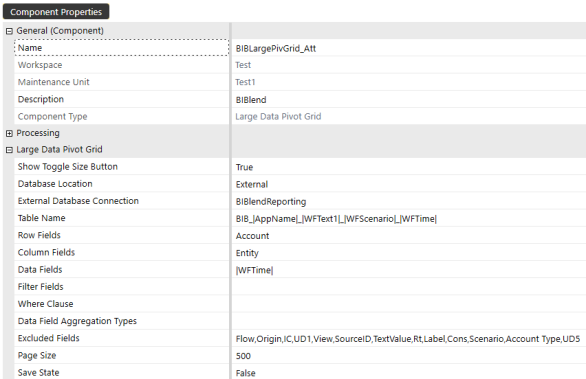
The Large Data Pivot Grid is a dashboard component designed to enable pivot style dashboard reporting and analysis on external database tables.
These are the key features of this component:
-
Server based processing. This is a key solution for accessing data in large tables. Pivoting requests are performed on the server, returning only the requested slice of data.
-
Supports paging to manage large datasets.
-
Measures support only a single aggregation type (Sum, Min, Max).
Data Adapters
Data Adapters with the following Command Types can be used to return data from Blend sources: SQL, BI-Blend, and Method.
NOTE: The Command Types Cube View and Cube View MD only work with data modeled as a cube. These options are used if blend data is first pulled into a dynamic cube using Dynamic Cube Services.
SQL Data Adapter
This Data Adapter can be used to query any SQL database. The returned records do not need to be unique.
To display data from the StageBiBlendInformation table, your Database Location selection must be Application. To display data from your Blend tables and views, your Database Location selection must be External.
BI Blend Data Adapter
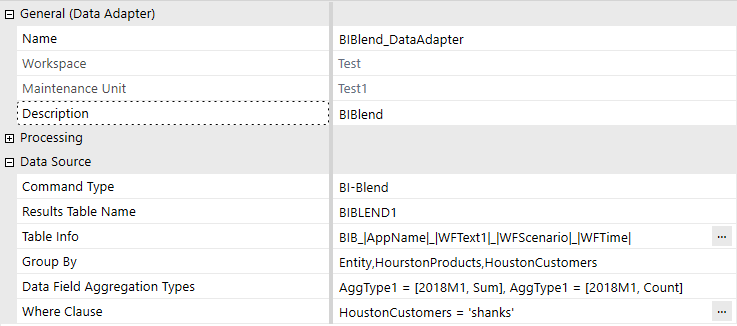
This Data Adapter is used to simplify writing queries to the BI Blend tables by eliminating the need for SQL scripting. This Data Adapter includes grouping, aggregation, and filtering fields. These fields are used to generate the SQL query. The BI Blend Data Adapter can only return unique records to the data table.
As an adapter, it cannot support the complete contents of very large BI Blend tables. The BI Blend Data Adapter should contain where clauses to slice the results into reporting slices. The BI Blend Data Adapter does not support paging to manage large volumes of records.
Method Data Adapter
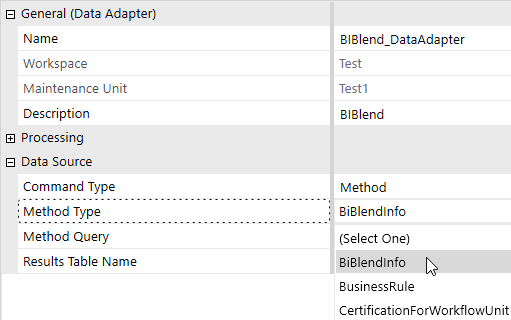
Method Data Adapters use predefined queries to return data. The Method Type options relevant to blend are BIBlendInfo and BusinessRule.
-
BiBlendInfo: This method query only returns data from the application table StageBiBlendInformation. The query takes the following form: {myWorkflowProfileName}{ScenarioName}{WorkflowTimePeriod}{<Where Clause>}. The first three parameters define the BIB-Table name and are used to return imports that have been run for that table from the StageBiBlendInformation table. The last parameter defines the <Where Clause> and should take the form of Name = Value.
NOTE: This method query returns information about a specific blend import. To return information on multiple blend imports, use a SQL Data Adapter.
-
BusinessRule: This method query enables you to return data from your Blend tables and views by configuring a predefined query that triggers logic stored in a Dashboard Data Set Business Rule. This option enables you to enhance the data returned, for example, by pivoting fields or performing dynamic calculations. This logic should be stored in either a Dashboard Data Set Business Rule or a Data Set Service Workspace Assembly File.
Dynamic Cube Services
Dynamic Cube Services enables you to better integrate your stored and Blend data for cube-based reporting options. It can also be used to give dimensionality to transient data fields by implementing the Dynamic Dimension Service. In addition, if modeled as a dynamic cube, you can perform translations and consolidations on your Blend data.
Review the following considerations:
-
Extended blend attributes are not currently supported by Dynamic Cube Services.
-
Dynamic Cube Services understands data as YTD. If your data is periodic, you may need to generate YTD data before using Dynamic Cube Services. Use a Blend Derivative Rule and TimeHelper function to produce records with YTD values.
-
Blend tables can be large and the datasets sparse, so when layering Dynamic Cube Services on top of blend, target only the required records.
-
Dynamic Cube Services does not support xBlend dimensions, such as xBlendDatetime.


